Persistent storage & databases
Persistent storage refers to any method of storing data that remains intact and accessible even after a system is powered off, restarted, or experiences a crash.
In the context of Windmill, the stakes are: where to effectively store and manage the data manipulated by Windmill (ETL, data ingestion and preprocessing, data migration and sync etc.) ?
We recommend using data tables to store relational data, and ducklakes to store massive datasets. Alternatively, you can connect your own database or S3 storage as a resource.
This present document gives a list of trusted services to use alongside Windmill.
There are several kinds of persistent storage in Windmill:
-
Data tables for out-of-the-box relational data storage.
-
Ducklakes for data lakehouse storage.
-
Small data that is relevant in between script/flow execution and can be persisted on Windmill itself.
-
Object storage for large data such as S3.
-
Big structured SQL data that is critical to your services and that is stored externally on an SQL Database or Data Warehouse.
-
NoSQL and document database such as MongoDB and Key-Value stores.
-
Volumes for persistent file storage attached to scripts, synced to object storage between runs.
Data tables
You can setup data tables directly within Windmill to store relational data, without needing to connect an external database. All details at:
Ducklake
Ducklake allows you to store massive amounts of data in parquet files on S3 while querying it with natural SQL syntax. Windmill offers first-class Ducklake integration to store large datasets in a data lakehouse format.
You already have your own database
If you already have your own database provided by a supported integration, you can easily connect it to Windmill.
If your service provider is already part of our list of integrations, just add your database as a resource.
If your service provider is not already integrated with Windmill, you can create a new resource type to establish the connection (and if you want, share the schema on our Hub).
States, resources & shared directory
Windmill has internal methods to persist data between executions of jobs: states and resources to store small transient JSON, custom flow states to share data across the steps of a flow, and the shared directory to pass files between steps running on the same worker.
These are convenient for small or transient payloads but are not recommended as a general-purpose persistence layer: states and resources are meant for small JSON, and the shared directory is ephemeral to a single flow execution. For larger or long-lived data, prefer an external database or object storage.
Large data: S3, R2, MinIO, Azure Blob, Google Cloud Storage
On heavier data objects & unstructured data storage, Amazon S3 (Simple Storage Service) and its alternatives Cloudflare R2 and MinIO as well as Azure Blob Storage and Google Cloud Storage are highly scalable and durable object storage services that provide secure, reliable, and cost-effective storage for a wide range of data types and use cases.
Windmill comes with a native integration with S3, Azure Blob, and Google Cloud Storage, making them the recommended storage for large objects like files and binary data.
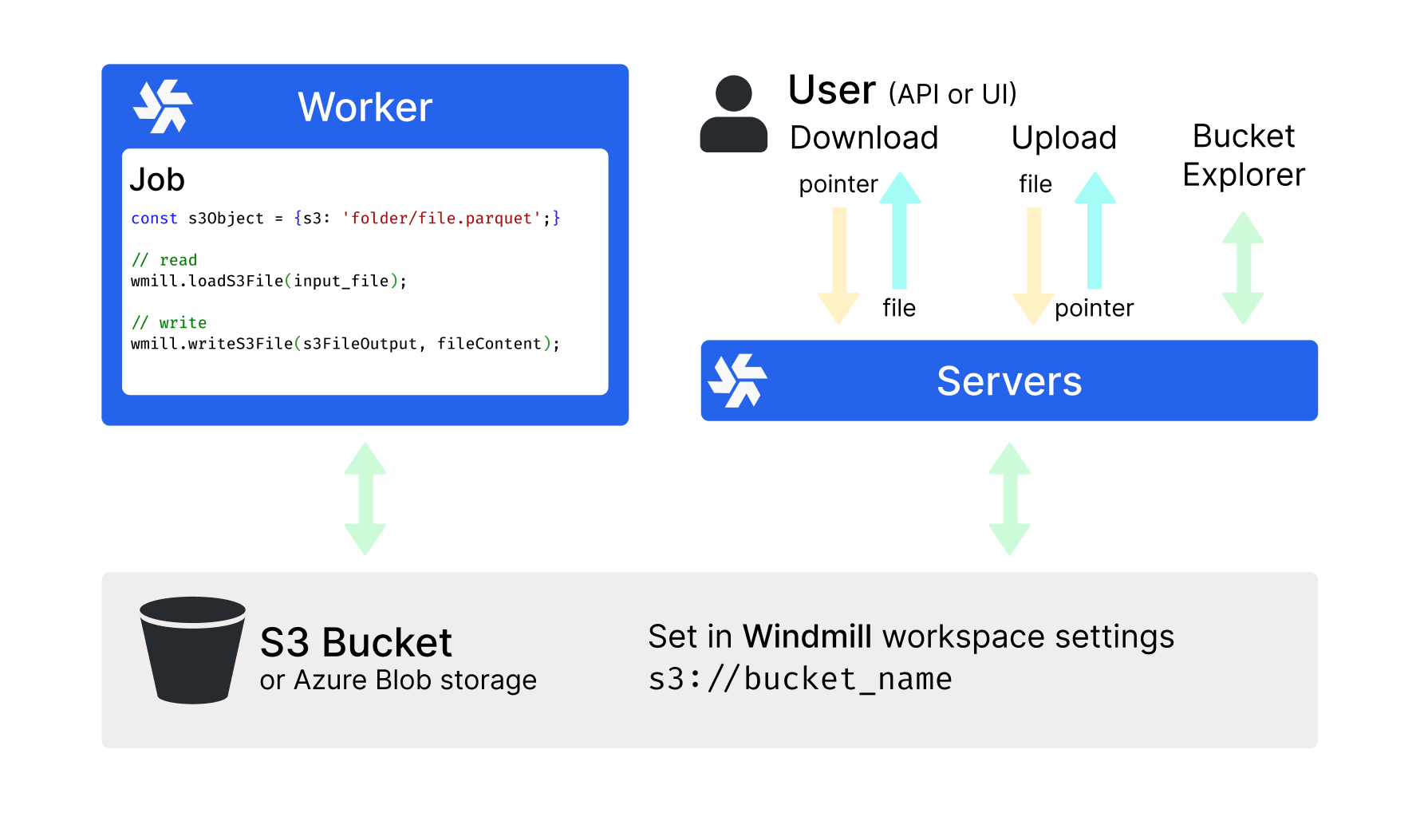
All details at:
Structured SQL data: Postgres (Supabase, Neon.tech)
For Postgres databases (best for structured data storage and retrieval, where you can define schema and relationships between entities), we recommend using Supabase or Neon.tech.
All details at:
Volumes
Volumes provide persistent file storage that can be attached to scripts via code annotations. Files written to a volume during a job run are synced back to object storage and restored on the next run, enabling stateful workflows like caching, model storage, or agent memory.
NoSQL & Document databases (Mongodb, Key-Value Stores)
Key-value stores are a popular choice for managing non-structured data, providing a flexible and scalable solution for various data types and use cases. In the context of Windmill, you can use MongoDB Atlas, Redis, and Upstash to store and manipulate non-structured data effectively.
All details at: