OpenFlow Spec
OpenFlow is an open standard for defining "Flows". Flows are directed graphs - directed acyclic graphs to be exact - in which every node represents a step of computation. In other words, it is a declarative model for chaining scripts.
Windmill is the open-source reference implementation for it, providing a UI to build Flows and highly scalable executors. However, everyone is welcome to build upon it and to develop new UIs that target OpenFlow, or create new executors.
Flows can be shared and showcased on Windmill Hub. To see an example of an OpenFlow in practice, go to the Hub and pick a Flow (e.g Upon new user sign up, check for existence in postgres, hash password, add record to postgres and Airtable, send an email to new user), then select the JSON tab to see its specification.
OpenFlow
We provide an OpenAPI/Swagger definition file for the spec, it is hosted within the GitHub repository here. It is the source of truth; the TypeScript equivalent below is a simplified version of it for ease of readability and omits some optional fields.
OpenFlow is portable and its root object is defined as follows:
type OpenFlow = {
	// a one-liner summary-line
	summary: string;

	// optional description
	description?: string;

	// the actual logic of the flow
	value: FlowValue;

	// the input spec of the flow as defined by a json schema
	schema?: any;
};
It contains a short line summary, a description, a schema which is the JSON Schema that constraints the JSON it takes as an input and the FlowValue type is where the logic of the Flow is actually defined.
FlowValue
type FlowValue = {
	// a sequence of modules, some of which are containers
	// for other modules, like a for-loop or a branch
	modules: FlowModule[];

	// the error handler to call in case of an unrecoverable error
	failure_module?: FlowModule;

	// a special module that runs before the first step when the flow
	// is invoked from an external trigger
	preprocessor_module?: FlowModule;

	// force this flow to be executed entirely on the same worker
	// and share a mounted folder to pass heavy data
	same_worker?: boolean;

	// the spec also defines optional flow-level settings not detailed
	// here: concurrency limits, caching, early stop and early return
	// expressions, debouncing, flow env variables, chat input, notes
	// and groups (see the OpenAPI definition)
};
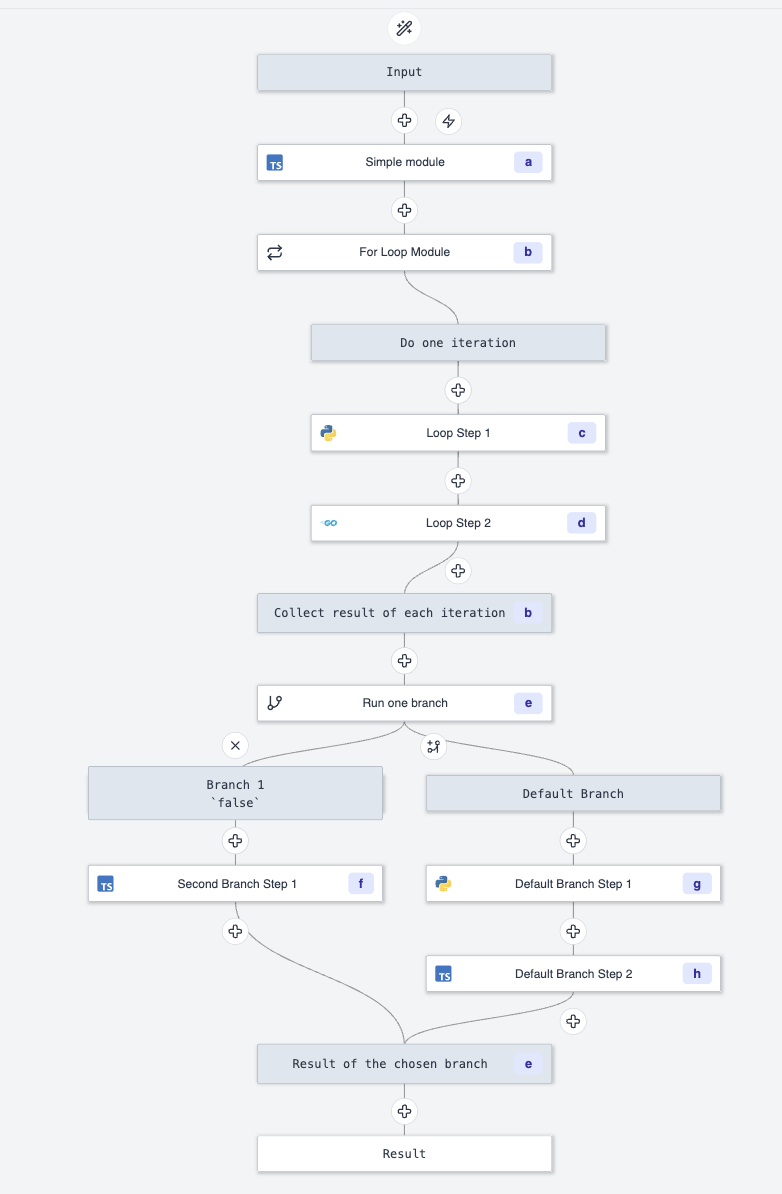
A Flow is just a sequence of modules, an optional failure module that will
be triggered to handle a failure at any point of the Flow (think try/catch in
terms of programming languages) and an optional preprocessor module. See an example of modules represented in a graph
below - this visualization is built-in on the Windmill Flow editor.
FlowModule
An OpenFlow module is defined as follows:
type FlowModule = {
  // unique identifier of the step, used to reference its result
  // via 'results.<id>' in later steps
  id: string;

  // a module can be one of many kinds, see below for more details
  value:
    | RawScript
    | PathScript
    | PathFlow
    | ForloopFlow
    | WhileloopFlow
    | BranchOne
    | BranchAll
    | Identity
    | AiAgent;

  // an optional summary line
  summary?: string;

  // stop the flow at this step if condition is met
  stop_after_if?: StopAfterIf;

  // for loops only: stop after all iterations if condition is met
  stop_after_all_iters_if?: StopAfterIf;

  // skip this step if condition is met
  skip_if?: { expr: string };

  // sleep for a static or dynamic number of seconds after this step
  sleep?: InputTransform;

  // cache the results of this step for a number of seconds
  cache_ttl?: number;

  // custom timeout for this step, static or dynamic
  timeout?: InputTransform;

  // return a mocked value without actually executing the step
  mock?: { enabled?: boolean; return_value?: any };

  // suspend the flow until it is resumed by receiving a certain number
  // of events before a timeout: this is how approval steps are built
  suspend?: {
    required_events?: number;
    timeout?: number;
    resume_form?: { schema?: any };
    user_auth_required?: boolean;
    user_groups_required?: InputTransform;
    self_approval_disabled?: boolean;
    hide_cancel?: boolean;
    continue_on_disapprove_timeout?: boolean;
  };

  // continue the flow even if this step fails
  continue_on_error?: boolean;

  // number of times to retry this module before passing it to the error handler
  retry?: Retry;
};

type InputTransform = StaticTransform | JavascriptTransform;

type StaticTransform = {
  type: 'static';
  value: any;
};

type JavascriptTransform = {
  type: 'javascript';
  expr: string;
};

type RawScript = {
  type: 'rawscript';
  input_transforms: Record<string, InputTransform>;
  content: string;
  language:
    | 'bun'
    | 'deno'
    | 'python3'
    | 'go'
    | 'bash'
    | 'powershell'
    | 'nu'
    | 'postgresql'
    | 'mysql'
    | 'mssql'
    | 'bigquery'
    | 'snowflake'
    | 'oracledb'
    | 'duckdb'
    | 'graphql'
    | 'nativets'
    | 'php'
    | 'rust'
    | 'csharp'
    | 'java'
    | 'ruby'
    | 'rlang'
    | 'ansible';
  path?: string;
  lock?: string;
  tag?: string;
};

type PathScript = {
  type: 'script';
  input_transforms: Record<string, InputTransform>;
  path: string;
  hash?: string;
};

type PathFlow = {
  type: 'flow';
  input_transforms: Record<string, InputTransform>;
  path: string;
};

type ForloopFlow = {
  type: 'forloopflow';
  modules: FlowModule[];
  iterator: InputTransform;
  skip_failures?: boolean;
  parallel?: boolean;
  parallelism?: InputTransform;
};

type WhileloopFlow = {
  type: 'whileloopflow';
  modules: FlowModule[];
  skip_failures?: boolean;
};

type BranchOne = {
  type: 'branchone';
  default: FlowModule[];
  branches: Array<{
    summary?: string;
    expr: string;
    modules: FlowModule[];
  }>;
};

type BranchAll = {
  type: 'branchall';
  parallel?: boolean;
  branches: Array<{
    summary?: string;
    skip_failure?: boolean;
    modules: FlowModule[];
  }>;
};

type Identity = {
  type: 'identity';
};

// AI agent step that can call its configured tools (scripts, flows,
// MCP servers, web search) to accomplish a task, see the OpenAPI
// definition for the full type
type AiAgent = {
  type: 'aiagent';
  input_transforms: Record<string, InputTransform>;
  tools: AgentTool[];
};

type StopAfterIf = {
  expr: string;
  skip_if_stopped?: boolean;
  error_message?: string;
};

type Retry = {
  constant?: {
    attempts: number;
    seconds: number;
  };
  exponential?: {
    attempts: number;
    multiplier: number;
    seconds: number;
    random_factor?: number;
  };
  retry_if?: { expr: string };
};
FlowModule value
The value field of the FlowModule type can be one of these 9 kinds:
identity: the most simple one, it passes its input as output. Useful for debugging.rawscript: embed a full script (in any of the supported languages) inside the Flow. Useful for custom logic and ad-hoc scripts.script: a reference to a Script by its path (including a path to the Hub using thehub/prefix).flow: a reference to another Flow by its path, run as a subflow.forloopflow: run a for-loop, which iterates over an iterator - a list in general - that is constructed by evaluating the JavaScript expression in:iterator. The result of this module is the results of the iterations collected as a list. Iterations can run in parallel with a configurable parallelism.whileloopflow: run a while-loop that repeats its modules until astop_after_ifcondition inside the loop is met.branchone: run exactly one branch out of many, based on a predicate. Predicates are evaluated in-order and the first one that matches, gets to run. In case none matches, the default branch is run. The result of this module is the result of the branch that was run.branchall: run many branches with all their modules, sequentially or in parallel. One can decide to skip failure of a particular branch. The result of this module is the results of the branches collected as a list.aiagent: run an AI agent configured with a provider, a prompt and a set of tools (scripts, flows, MCP servers) that it can call to accomplish its task.
Input transforms
RawScript, PathScript and PathFlow modules contain input_transforms, which is a
mapping between fields (i.e. input of the module) to either a static JSON value,
or a raw JavaScript expression.
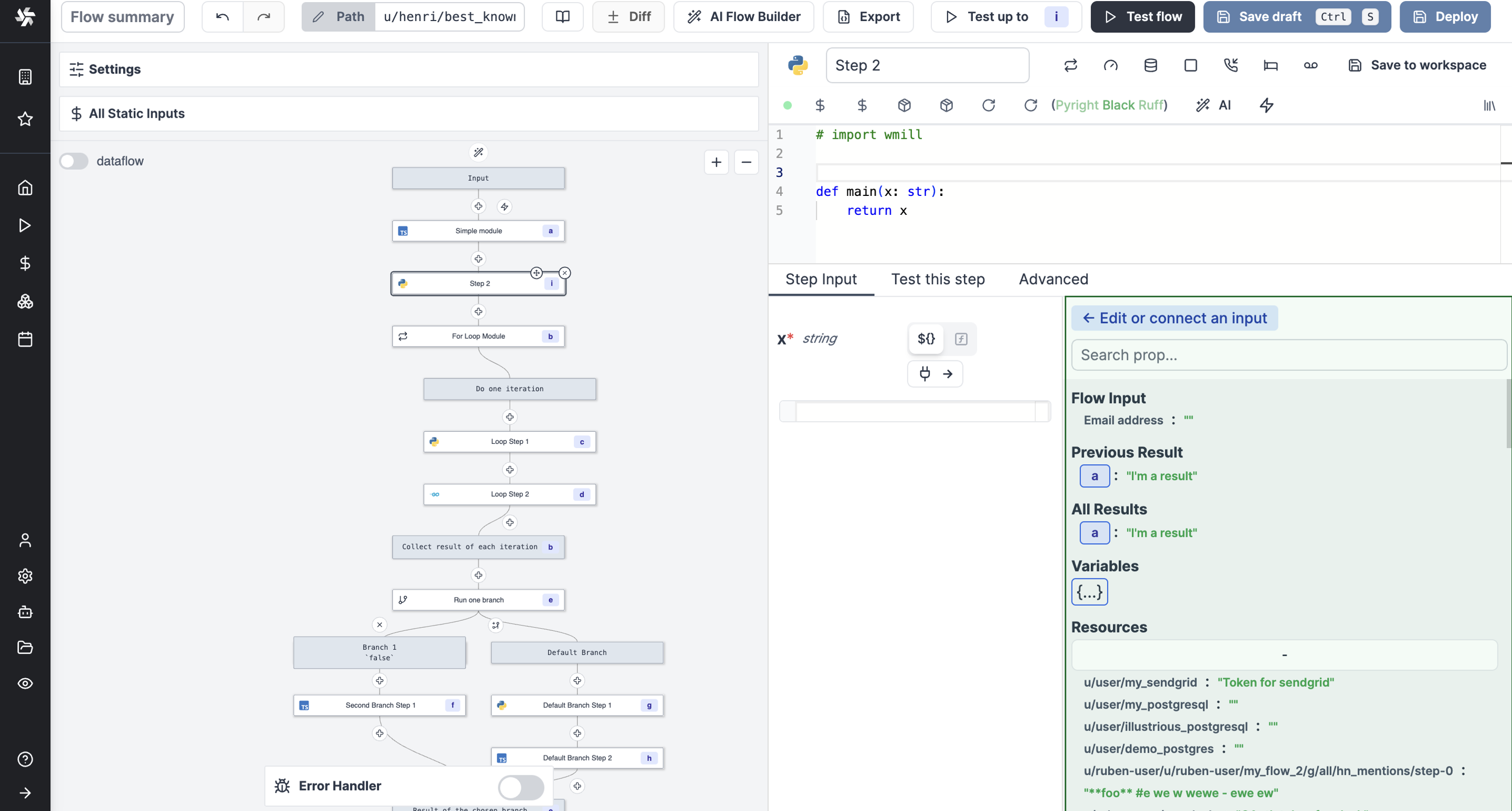
The input_transforms is the way to do the piping from any other previous
steps, variable, or resources to one of the inputs of your script/module. Since
it is actual JavaScript (although a restricted JavaScript, for example, fetch is
limited to getting secrets and variables), it is very flexible.
One interesting pattern that this allows is that you can compose complex strings directly, so you could imagine composing your email body or SQL query using string interpolation and populating it with previous results. The Windmill Editor makes it very easy to do so, using the properties picker:
More details at:
Conditional stop after
There's also the stop_after_if optional object:
type StopAfterIf = {
	expr: string;
	skip_if_stopped?: boolean;
	error_message?: string;
};
If present:
-
stop_after_if.expr: evaluate a JavaScript expression that takes the result as an input to decide if the Flow should stop there.Useful to stop a Flow that is meant to watch for changes if there are no changes.
-
stop_after_if.skip_if_stopped: used to flag stopped runs as skippable.It is useful in the context of Flows being triggered very often to watch for changes as you might want to ignore the runs that have been skipped.
-
stop_after_if.error_message: if set, stop with an error carrying this message instead of a success.
Suspend and resume
The module-level suspend object determines the number of
events (resume messages) needed to progress to the next step in the Flow. This
is useful for inserting user inputs during the execution of a Flow, such as
approving (resume) or disapproving (cancel) a Flow. See Approval/Suspend steps.
Resume messages are sent to
https://app.windmill.dev/w/<WORKSPACE>/jobs/resume/<JOB_ID> as POST or GET
requests. Requests must have JSON payload, either as the request body (with
Content-Type: application/json header) for POST requests, or as the value to
the payload query parameter as a base64url encoded JSON value
(?payload=${base64url_encoded_json}) for GET requests.
When enough resume messages are received, the next job starts with its
input_transforms evaluated with two notable variables in scope:
resume: The payload from the most recent resume message.resumes: A list of payloads from all resume messages in the order they were received - most recent at the end of the list.
Alternatively, a job can be immediately canceled by a request to a similar
endpoint at ../jobs/cancel/... In this case, the Flow will quit, with the
cancellation payload as the result and without retrying or running further steps
or the failure modules.
Retries
Retry sets the retry policy for a module. It is optional and is reset on every
successful run:
constant: Retryattemptstimes withsecondsdelay after each try.exponential: Applies the exponential backoff strategy to the retries - meaning the delay will be multiplied after each unsuccessful attempt, with an optionalrandom_factorjitter percentage. If all the retries are exhausted, the failure module - if any - is called.retry_if: an optional JavaScript expression over the error to decide whether a failure should be retried at all.
Et voilà, we have completed our tour of OpenFlow.