Alternative to Kestra for workflow orchestration

Kestra is an event-driven orchestration platform that allows developers to build and run workflows declaratively in code.
We have tested and conducted performance benchmarks on Kestra, and this page outlines our conclusions. Please note that the content is written by Windmill; feel free to contact us for any requests or modifications. For a visual side-by-side of both products, see the Windmill vs Kestra comparison page.
- Windmill vs Kestra at a glance
- Who each platform is built for
- Open source
- Language support and dependencies
- Architecture and development experience
- Data, resources and secrets
- Integrations
- Migration and lock-in
- Features comparison
- Enterprise requirements
- Performance
- Pricing
- Conclusion
Windmill vs Kestra at a glance
Windmill is an open-source workflow engine and developer platform to build and orchestrate internal software: scripts, workflows, data pipelines, AI agents and internal apps. It is made for engineers who want full code flexibility and a local development experience, both to build internal software and to manage the underlying infrastructure.
Kestra is an open-source workflow orchestrator for data, AI and infrastructure pipelines. Flows are declarative YAML, backed by a catalog of 2,600+ plugins. It suits teams that prefer configuration over imperative code and already think in YAML DAGs (Airflow, dbt, Kubernetes).
Both platforms orchestrate workflows. The difference is what else you can build on the same runtime.
| What you can build | Windmill | Kestra |
|---|---|---|
| Workflows: chain scripts into flows with branching, retries and approval steps | Yes | Yes |
| Data pipelines: ETL, syncs and scheduled data jobs with parallel branches | Yes | Yes |
| Scripts: standalone functions exposed as APIs, webhooks or cron jobs without a wrapping workflow | Yes | No |
| AI agent workflows: agents that call tools, branch on outputs and run as workflows | Yes | Yes |
| AI sandboxes and volumes: isolated environments with persistent volumes for running agents | Yes | No |
| Low-code internal apps: drag-and-drop dashboards and admin tools with built-in components | Yes | Partial (Enterprise Apps, defined in YAML) |
| Full-code internal apps: custom dashboards and admin tools built in React or Svelte | Yes | No |
| Scheduled tasks: cron jobs with retries, error handling and alerting | Yes | Yes |
Windmill is built to centralize and orchestrate internal software in one place. Scripts, workflows, data pipelines, full-code apps, AI agents and operator UIs run on a single runtime, with shared resources, auth and observability. Kestra focuses on workflow orchestration, so you bring your own stack for dashboards, internal apps and agent front-ends.
Who each platform is built for
Windmill is built for developer-led teams where engineers own the platform end to end: code, Git, local development, workspace forks, code review, CI/CD, AI coding tools and infrastructure as code. Non-developers consume what engineers build through auto-generated UIs, custom apps and run-only workspace roles. Reading or editing the flow logic itself still requires comfort with code.
Kestra is designed for teams that prefer declarative YAML over imperative code. Data, ops and SRE engineers already comfortable with config files (Kubernetes manifests, dbt configs, Airflow DAGs) onboard faster than they would on a code-first platform. Anyone comfortable reading YAML can inspect flows. Meaningful edits still require understanding plugin task types, Pebble templating and trigger configs, which is its own technical skill.
Non-technical users can only partially author workflows on Windmill: it has a visual flow editor and auto-generated UIs, but authoring steps still involves writing code. Kestra's declarative YAML is a better fit for teams already comfortable with config files. Neither platform makes non-technical authoring frictionless.
Open source
Both Windmill and Kestra have an open-source core that can be self-hosted, with Enterprise features sold separately. They both offer an easy installation process through Docker, with pre-populated tutorial flows to help users get started.
Windmill provides and integrates into its platform a public community Hub where users share useful and proven scripts, flows, and applications.
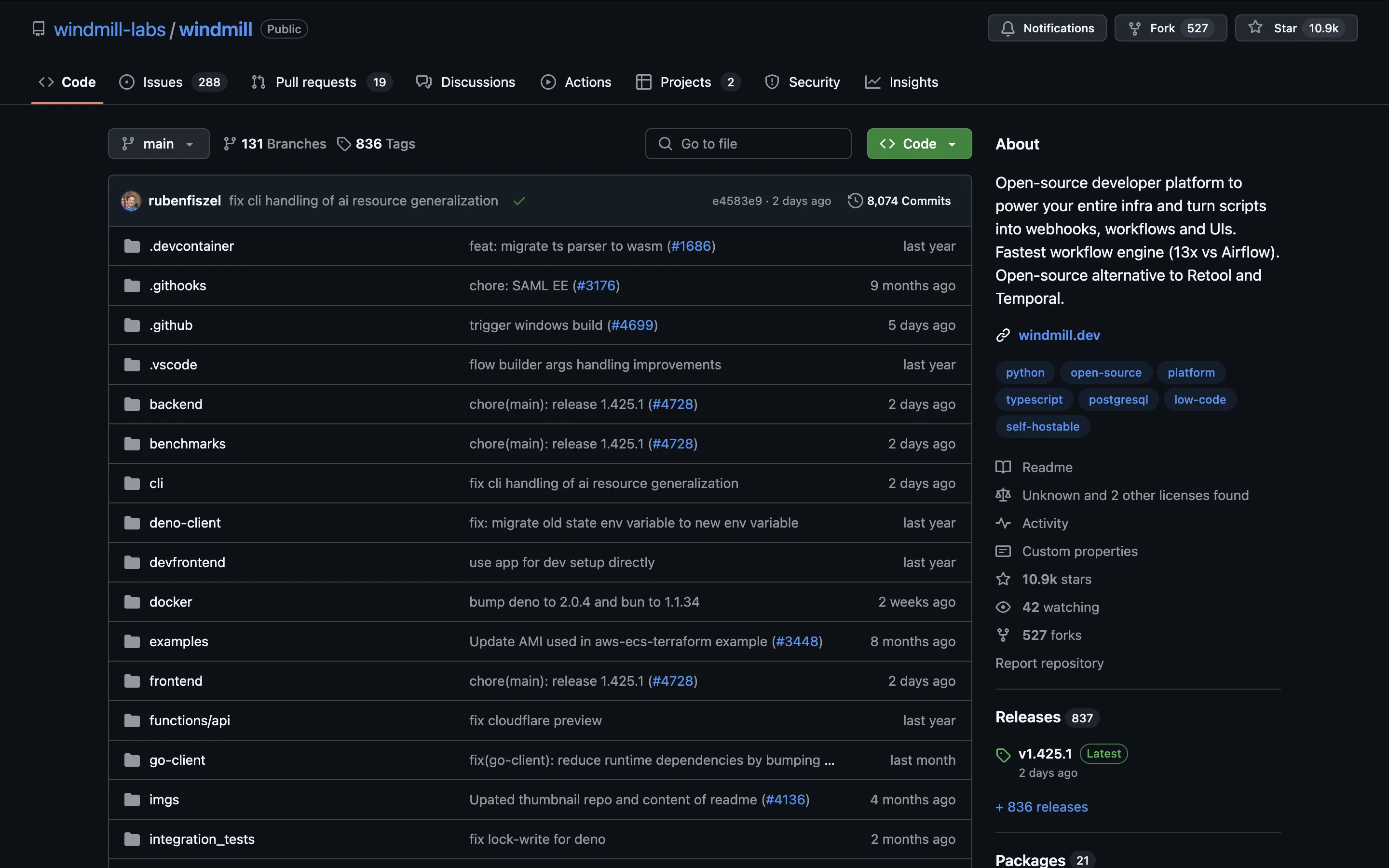
Windmill Git repository
Licenses
Windmill's open-source core is AGPLv3, which requires source availability for network-exposed modifications. Kestra's open-source core is Apache 2.0, which is more permissive if you plan to modify and redistribute. Both are free to self-host for unmodified use, and both offer a managed cloud. If the license permissiveness of the core is a hard constraint, Kestra is ahead on this point.
Language support and dependencies
Kestra provides native support for Python, R, Node.js, Julia, Ruby, Shell, and PowerShell scripts. Additional language support is available through Docker containers. While this offers flexibility, there are some key differences in how dependencies are handled:
- In Kestra, dependency caching and pre-installed dependencies need to be managed manually by the user
- Windmill automatically handles dependency installation and caching, allowing developers to focus on writing code
- Windmill supports TypeScript, Python, Go, Bash, SQL and more languages natively
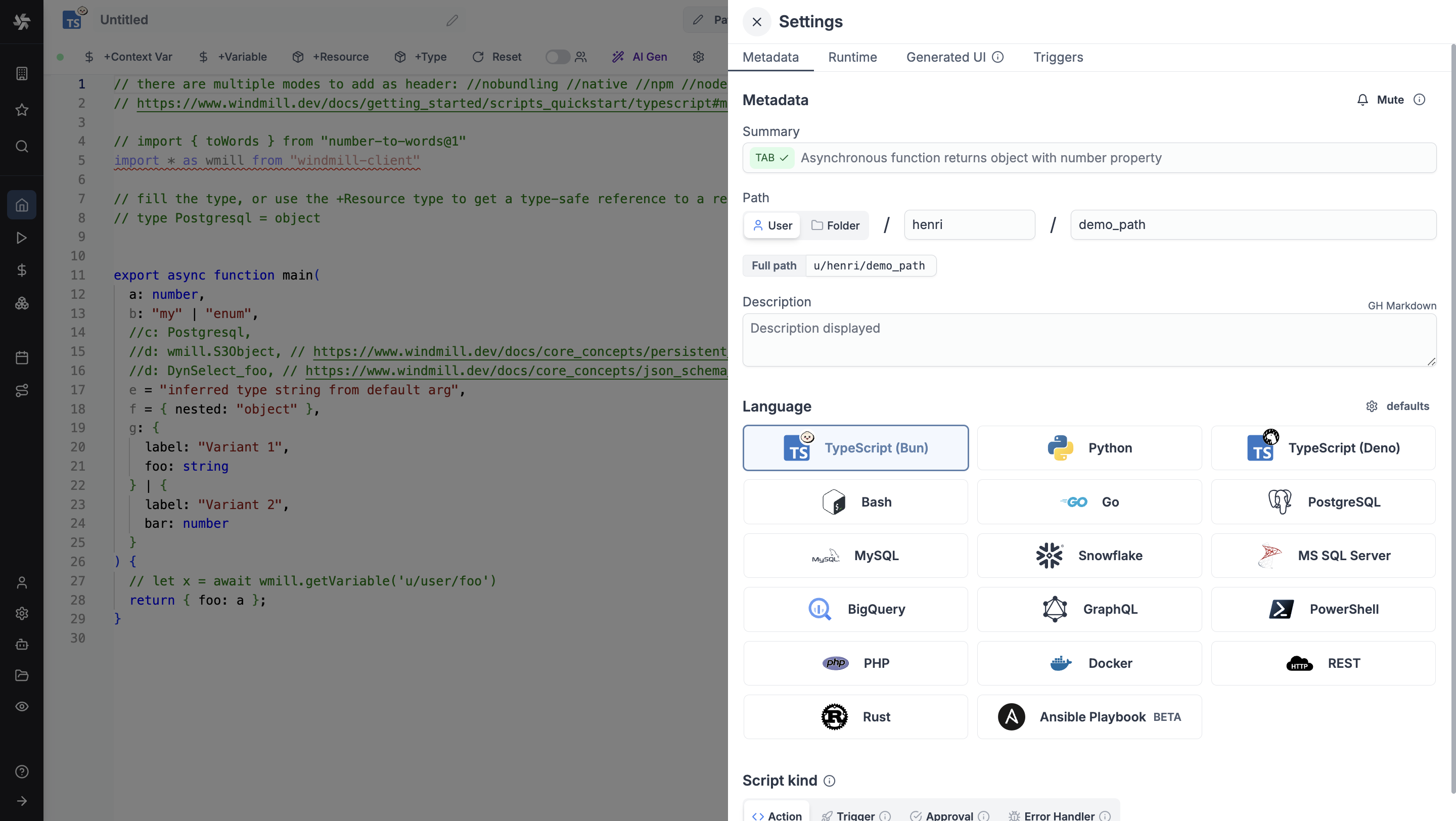
Windmill runs TypeScript (Deno, Bun, Node.js), Python, Go, Bash, SQL, PowerShell, PHP, Rust and more (20+ languages in total). Any npm, PyPI, Go, Maven or Cargo package is a first-class import with automatic dependency resolution and a per-script lockfile, and relative imports work across Python and TypeScript scripts in the same workspace.
Kestra runs its script languages through the io.kestra.plugin.scripts.* plugins.
Each runs inside a Docker container with a configurable image, so packages install via pip, npm, gem and similar tools during the task.
Architecture and development experience
Both platforms share a similar architecture centered around a queue-based system for event-driven orchestration of tasks and flows. However, there are several key differences in the development experience.
Configuration and workflow building
Kestra:
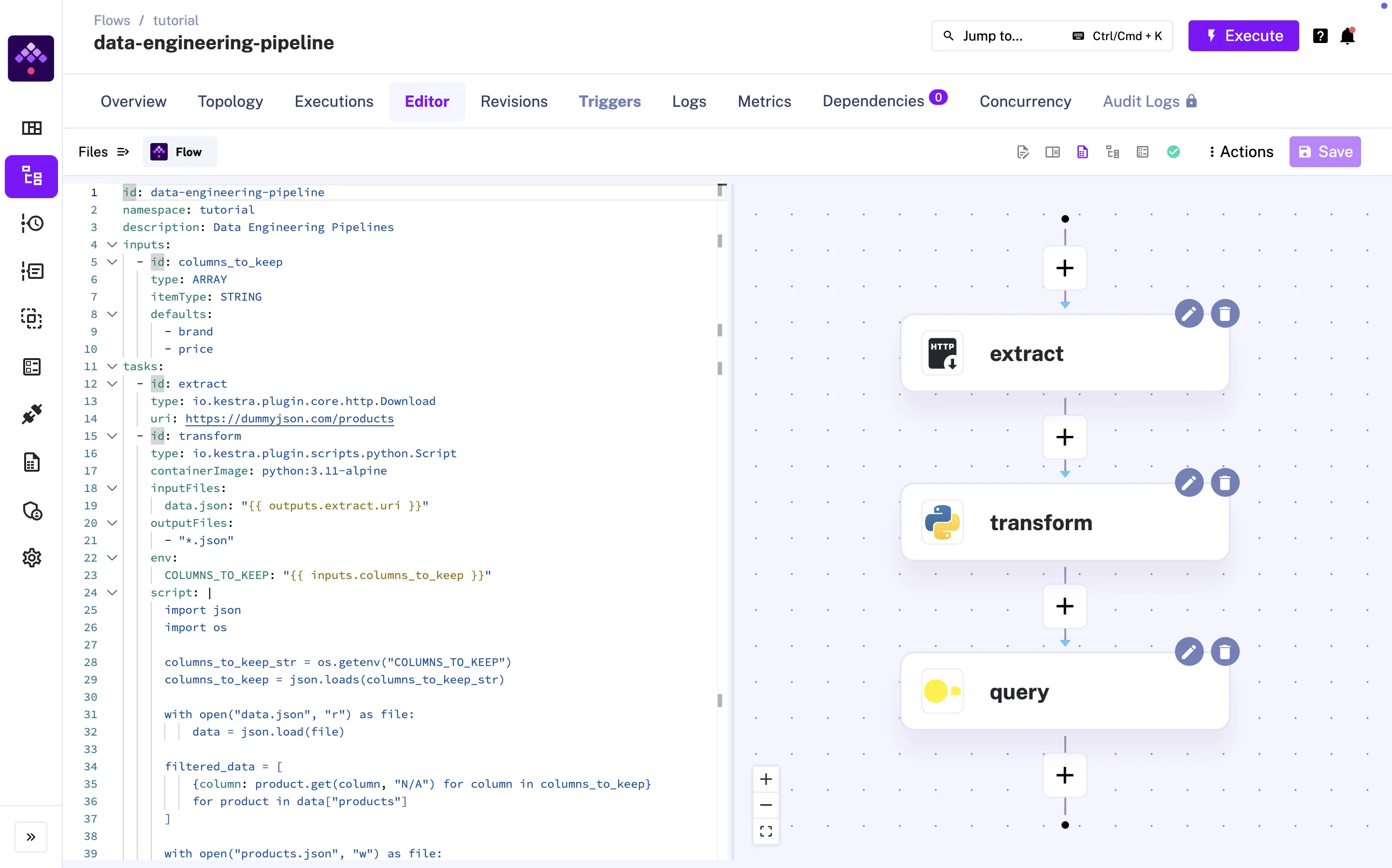
- Uses YAML-first configuration for workflows where scripts are referenced as files (recently introduced a no-code interface for basic workflow creation)
- Requires passing arguments between steps through file I/O
- Passes simple arguments as environment variables
Kestra is YAML-first. Workflow creation is done through a YAML file. Each task is a value in the YAML, and most of your tasks will be separate files that need to be referenced in the flow (e.g. Python code can use io.kestra.plugin.scripts.python.Script or io.kestra.plugin.scripts.python.Commands).
Windmill:
- Provides a UI for workflow configuration and step advanced settings
- Offers a visual Flow Editor
- Allows direct passing of arguments between steps
- Supports both UI-based and code-based workflow creation
In Windmill, a step is simply a script in a language—nothing more. From the flow editor, you can select an existing script from your workspace or the Hub, or just write it directly in the integrated code editor. Each step can either be forked or saved as a separate script in your workspace.
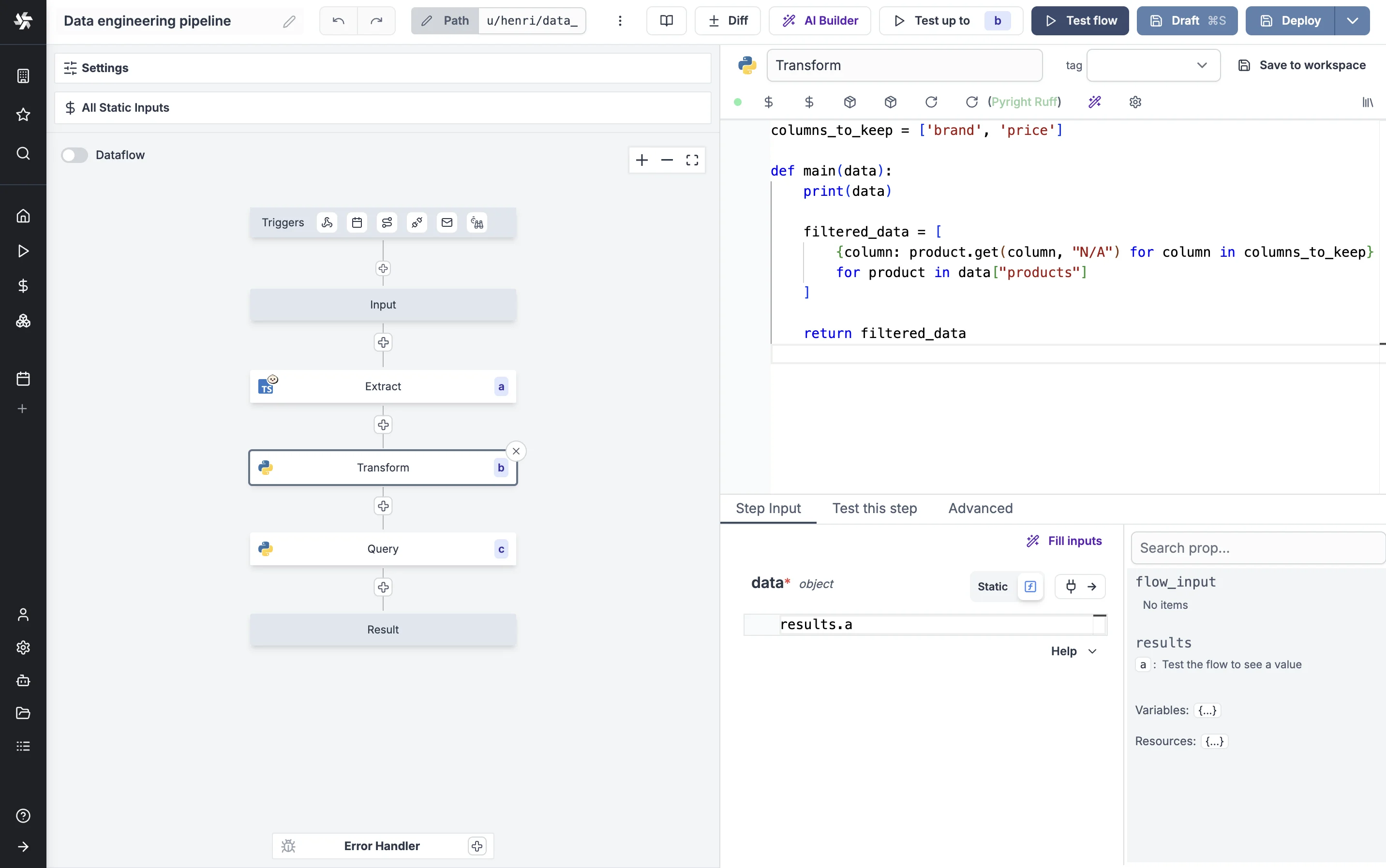
Windmill parses the function signature of each script to generate its input UI, JSON schema and argument types. Arguments pass between flow steps as direct return values, with no templating. Besides the visual flow editor, you can define a workflow programmatically in Python or TypeScript with workflows as code, using native try/catch, parallel branches and the language's own control flow.
In Kestra, scripts in Python, Node.js, R, Shell and other languages can be saved as namespace files, but a script can't run on its own. Every execution happens as a task inside a YAML flow, which defines inputs, outputs, dependencies and triggers. There is no standalone script primitive with its own UI or API endpoint.
- Windmill: low-code DAG
- Windmill: workflow as code
- Kestra: YAML
Compose steps visually as a DAG with branches, loops and approval steps. Each step can be written in 20+ languages.
This video shows how to create the same flow in Kestra and Windmill. It does not cover advanced features but focuses on the flow creation experience. For advanced benchmarks, see Performance.
Developer tools
Windmill is designed to integrate seamlessly with your existing tool stack and processes, with specific support for:
- Local development support
- Windmill CLI
- Git sync for version control
- VS Code extension
- Built-in code editor with AI assistance for autocomplete and code generation
Although Kestra offers an alternative for some of these features (Version control with Git, Server CLI), it does not allow for as seamless an integration with your existing tools.
With Windmill, you run scripts locally with the CLI and keep native language tooling (LSP, type-checking, linting), the VS Code extension and AI coding tools such as Claude Code and Codex. Kestra provides a YAML schema with validation in its VS Code and JetBrains plugins, and a local server for running flows before deploy.
Git and CI
In Windmill, scripts, flows, apps, resources, variables, secrets, schedules, folders, groups and permissions are all files in Git, deployed with the CLI and Git sync (see infrastructure as code). Internal tooling runs like application code: pull requests, reviews, rollbacks and CI/CD.
In Kestra, the open-source SyncFlows and SyncNamespaceFiles Git tasks and the kestractl CLI deploy flows and namespace files from a repository; syncing apps, blueprints, unit tests and dashboards is Enterprise.
Managing users, groups, roles and service accounts with kestractl is also Enterprise.
In open source, users and tenant settings live in the UI or behind the API.
Data, resources and secrets
Windmill has data tables with SQL queries, versioning and a browse and edit UI. Resources (typed JSON for credentials, connection info and configs) and variables (individual secrets) are reusable across scripts, flows and apps. They are encrypted at rest, scoped with folders and groups for access control, and versioned in Git. External secret backends such as Vault and AWS Secrets Manager are available on Enterprise Edition.
In Kestra, S3 access goes through the io.kestra.plugin.aws.s3.* plugin.
Per-task input and output files and a built-in KV store cover smaller values, and there is no dedicated data tables primitive.
The open-source edition ships basic secrets as base64-encoded environment variables.
The UI secret manager, namespace- and tenant-scoped secrets, and external backends (Vault, AWS Secrets Manager) are Kestra Enterprise features.
Integrations
Connecting to external systems
In Windmill, any npm, PyPI, Go or Maven package is a first-class import with automatic per-script dependency resolution and lockfiles. There is no plugin layer in between: you call the vendor's own SDK, with type inference and auto-completion in the editor. 200+ pre-built resource types cover common databases (Postgres, Snowflake, BigQuery), SaaS (Slack, Stripe, GitHub, Notion, OpenAI) and infrastructure (S3, Redis, Kafka). You paste an API key into a typed form, and the resource is shared across scripts, flows and apps, encrypted at rest. The community Hub has reusable scripts and flows for common tasks.
Kestra has a curated catalog of 2,600+ plugins, with official connectors for Snowflake, BigQuery, dbt, Airbyte, Salesforce, Databricks and most common data-stack tools. Each plugin bundles tasks, triggers and connection types that you reference by their fully qualified name in the flow YAML, with configuration that lives in Git alongside the flow. Internally a task can wrap SQL, Python, shell or an API call; from the flow definition's perspective the surface is uniform YAML.
Windmill does not have a curated plugin catalog the size of Kestra's. The trade-off is that in Windmill the package ecosystems themselves act as the catalog. For mainstream data-pipeline tools that Kestra has official plugins for, Kestra is often easier to get started with.
- Windmill: imports
- Kestra: plugins
Type import stripe in the script editor and run.
Windmill detects the import, resolves the version and pins it in a per-script lockfile, with no venv, no pip install and no restart.
Receiving events
Windmill has native triggers for HTTP, cron, Kafka, NATS, Postgres CDC, SQS, MQTT, SMTP and WebSocket. Each trigger is configured in the UI: set the topic, subject or path, attach it to a script or flow, and Windmill handles the connection, replay and consumer-group state. Every script also gets an HTTP endpoint and a webhook URL, so most receive paths need no glue code. Kafka, NATS and SQS triggers are self-hosted Enterprise features, and Postgres and MQTT triggers are not available on Windmill Cloud.
Kestra has six core trigger types: Schedule (cron), Flow (run on another flow's completion), Webhook, Polling (check an external system on a cadence), Realtime (react to events with millisecond latency) and MCP Tool (expose a flow as a tool on a Kestra MCP server). Plugin-based triggers extend the same model to Kafka, AMQP, JMS, MQTT and S3 events.
Extending the platform
In Windmill, a new integration is a script with a new import: save and run, with no restart and no image rebuild. This works the same in the web editor, the CLI and Git sync. Custom logic can be exposed as a typed script or packaged as a resource type for shared use.
Kestra has three options. You can write a Java plugin against the Kestra SDK and ship it as a JAR alongside the worker. You can drop to an inline Python, Node or shell script inside a flow for one-off logic. Or you can save code as namespace files and call them from any flow in that namespace, the closest analogue to shared scripts.
Migration and lock-in
Both platforms solve workflow orchestration with a queue-based, event-driven architecture, so the mental model transfers. There is no automated converter from Kestra YAML to Windmill today. Migration is a manual rewrite where each Kestra task becomes a Windmill script or flow step. Most ported workflows end up shorter because Windmill passes arguments directly between steps and auto-generates input UIs. Workflows that rely on specific Kestra plugins for exotic systems may require replacing those plugins with equivalent SDK calls in code.
Getting in
In Windmill, you paste a function body into the script editor, and Windmill infers the arguments, generates a UI and handles dependencies. There is no YAML to learn. Triggers, schedules, variables and apps migrate one by one.
In Kestra, if you already think in YAML DAGs (Airflow), the mental model transfers. Each task becomes a plugin reference, with scripts inline or as files.
Getting out
Windmill step logic is standard TypeScript, Python, Go, Bash or SQL that runs anywhere. The CLI exports the full workspace as plain files. What you lose when leaving Windmill is the runtime, not the step code.
Leaving Kestra depends on what your flows use.
Inline Python, Node or Shell scripts port cleanly, since the code body is standard.
Ecosystem plugins (io.kestra.plugin.snowflake.*, stripe.*, etc.) need rewriting against the vendor's SDK.
Built-in flow primitives (subflows, retries, conditionals) and Pebble templating ({{ inputs.x }}) also need reimplementing on the new platform.
Features comparison
Kestra and Windmill have a very similar set of features as they address the same needs. Both platforms offer core workflow engine features like scheduling, webhooks, and error handling.
However, there are a few features where they stand out from each other.
What Kestra does differently (and well)
- Large number of trigger types through plugins
- Backfill capabilities
- Simple architecture where a script is treated as a one-step flow, only one editor
- A curated catalog of 2,600+ plugins with official connectors for mainstream data-stack tools (see Integrations)
- Declarative YAML that teams used to config files (Kubernetes, dbt, Airflow DAGs) can read and onboard to quickly (see Who each platform is built for)
- An Apache 2.0 open-source core, more permissive than Windmill's AGPLv3 for redistribution (see Licenses)
What Windmill offers additionally
- Automated UI generation for script and flows input fields
- Configurable workspace roles, billed as half a seat, for users who only trigger flows
- Approval steps in the Community Edition (Kestra's open-source Pause task resumes on a click; its Human-in-the-Loop Approvals are Enterprise)
- Low-code App Editor and full-code apps (React/Svelte) for building UIs
- Reusable variables, secrets, and resources
- Built-in worker logs and metrics (EE only)
Enterprise requirements
Both platforms cover the enterprise basics: RBAC, SSO, audit logs and SOC 2.
| Windmill | Kestra | |
|---|---|---|
| Observability | Real-time streaming logs, inputs, outputs and duration for every run, and a trace ID on every job. Built-in worker logs and metrics are EE only. | Execution logs, task-level timings, metrics via OpenTelemetry and dashboards |
| Audit logs | Audit logs of who ran, edited or deployed what. Full, unredacted entries need the Enterprise Edition; on the self-hosted Community Edition, entries are redacted or not recorded. | Tracks platform events and user activity, Enterprise only |
| Security | SOC 2 Type II report covering the Enterprise Edition. RBAC, SSO for up to 10 users, encrypted secrets at rest and optional job isolation (off by default) in open source. Uncapped SSO and advanced access controls (SCIM, SAML) are EE. | RBAC, SSO (SAML, OIDC) and secret manager integrations are Enterprise only. Kestra Cloud is SOC 2 compliant. |
| Multi-tenancy and isolation | Multiple isolated workspaces on the same instance, each with its own users, resources, secrets and access controls. The self-hosted Community Edition is capped at 3 workspaces; unlimited is EE. | Single tenant in open source. Namespaces organize flows but share the same users, secrets and access controls across the whole instance. Tenant isolation is Enterprise only. |
Performance
Between jobs, a normal Windmill worker spends around a dozen milliseconds on clean-up and cold start; dedicated workers (Cloud plans and self-hosted Enterprise) keep the runtime and dependencies warm.
Each worker can run up to 26 million jobs a month when each job lasts about 100ms (worker groups). Kestra publishes its own throughput benchmarks.
Also, Windmill has a transparent API, on which you could imagine launching 1m simulateously by API.
We have conducted benchmarks to measure our performance against our competitors.
In normal mode, Windmill is slightly faster than Kestra, while in dedicated worker mode, Windmill is 3x faster. For heavy-duty tasks that run for minutes, per-task overhead is a rounding error and the gap disappears.
Kestra is queue-based and horizontally scalable, with per-task overhead from JVM startup, plugin loading and state persistence. That overhead is negligible for multi-minute tasks. Windmill is faster for short, high-volume workloads like webhooks, alerts and small scripts, while Kestra is a good fit for long-running data tasks where per-task overhead doesn't matter. See the Kestra benchmark for the setup and results.
Pricing
Windmill has a transparent pricing policy, with clear steps for implementation. Every feature mentioned above is free with Windmill, unless mentioned otherwise (EE). See all Enterprise Edition features on our Pricing page.
Windmill's AGPLv3 core is free to self-host in production with no limit on executions.
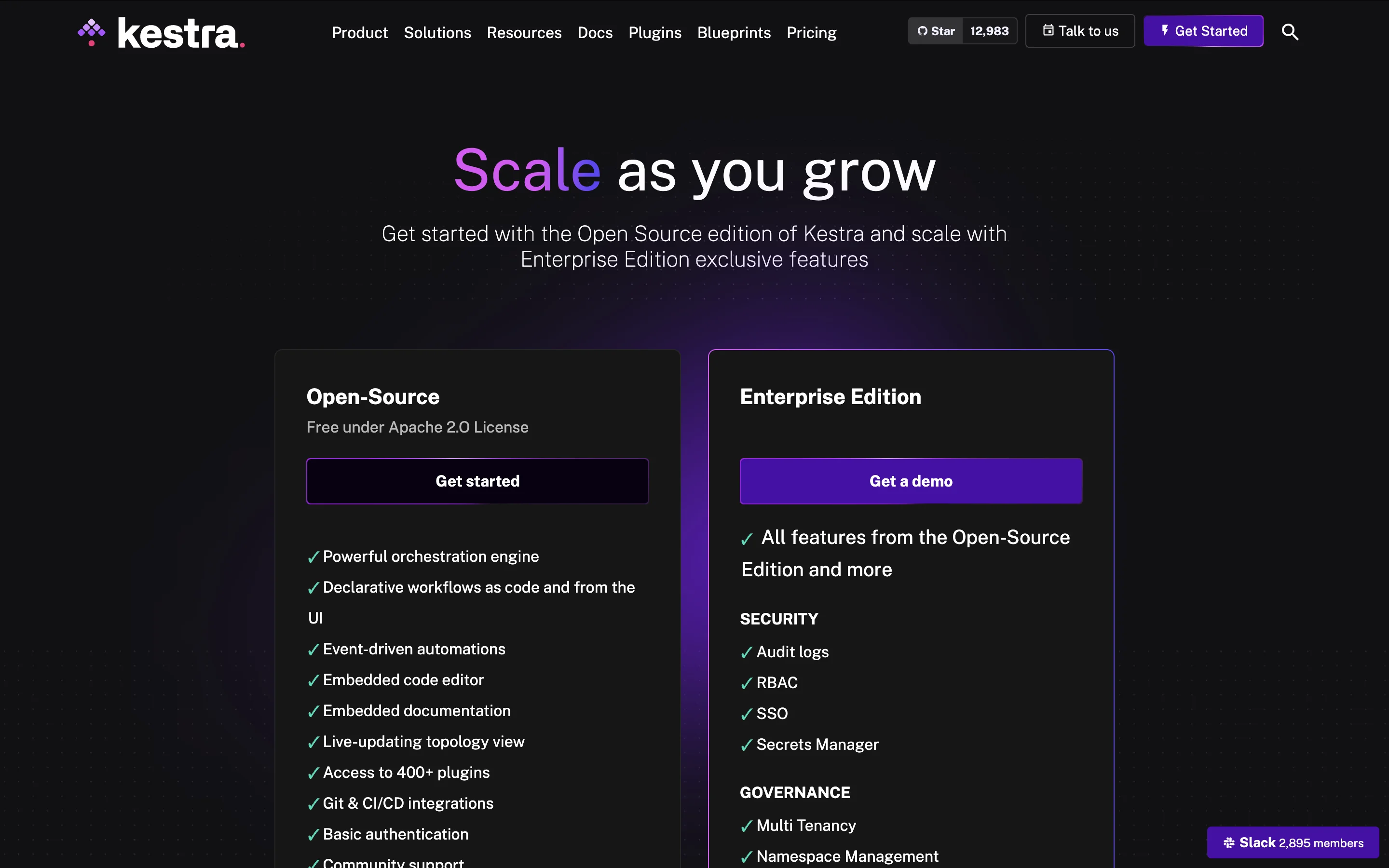
Kestra Enterprise adds SSO, multi-tenancy, audit logs and advanced RBAC. As of November 2026, Kestra does not disclose its Enterprise pricing (screenshot below from November 2024):
Conclusion
Windmill and Kestra solve orchestration with two different grammars. Kestra models a workflow as a declarative YAML flow where every task is a plugin reference. Windmill models a workflow as a graph of real scripts where each script is also a standalone primitive with its own UI, API endpoint and scheduler.
Kestra can be a good fit if your team already thinks in YAML DAGs, your workload is mainstream data orchestration that its plugin catalog already covers, and Apache 2.0 licensing of the core matters for redistribution. The switching cost is asymmetric: Windmill step logic is standard code that runs anywhere after you leave, while Kestra flows built on ecosystem plugins and Pebble templating have to be rewritten on any other platform.
Kestra offers a solid foundation for workflow orchestration with its extensive plugin system. We believe that Windmill is a more intuitive solution for developers: the user doesn't need to "learn" a new framework but simply write code in the language they already know, using the tools they are already familiar with (VS Code, GitHub, etc.). Dependencies are automatically handled and all settings are in an intuitive UI, not in a YAML file that only a few developers in your organization are familiar with.
The choice between the two may come down to specific needs: if you're looking for a pure workflow orchestration tool with extensive plugins, Kestra might be sufficient. However, if you need a more complete platform that includes UI building, automated dependency management, and intuitive development experience, Windmill would be the better choice.
If you're deciding between the two, the fastest way to judge is to spend an afternoon in each.