Guest apps
A guest is someone with no Windmill account, a member of no workspace, whose identity your identity provider authenticates or your own backend asserts with a signed JWT. A guest can open an app set to Guests and nothing else. The app's runnables execute on behalf of the publisher, exactly as they do for a workspace member.
Guest access sits between the two modes an app already had: a public app is open to anyone holding the URL, while a guest app admits a named identity, authenticated but with no account. Because a guest leaves no user row behind, they do not take a seat; they count against a separate guest allowance instead.
Guest access is off by default and is gated by three independent switches, all of which must be on for a guest to get in.
A guest gets in one of two ways: by signing in through the identity provider, or with a JWT your own backend signs, which needs no identity-provider round trip and so works inside an iframe where popups and third-party cookies do not. Both resolve to the same identity, under the same switches and the same allowance.
Opening an app to guests
In the app editor, the Deploy menu has an Access control with three options:
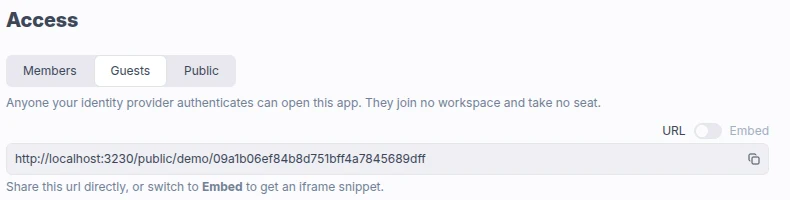
| Access | Execution mode | Who can open the app |
|---|---|---|
| Members | publisher | Workspace members with read access on the app. The default. |
| Guests | guest | The above, plus anyone with no Windmill account whom the identity provider authenticates or a guest JWT names. |
| Public | anonymous | Anyone holding the secret URL, with no login at all. See public apps. |
An app deployed in viewer execution mode, where runnables run as the viewer rather than as the publisher, shows as Members here: a guest cannot be a viewer, so the control never sets that mode.
Guests reach the app through the same URL as a public app: the secret public URL, or the custom URL when one is set. Holding the URL is not enough on its own: a visitor arriving without a guest JWT is asked to sign in first.
An app path containing :, , or *, or starting with /, cannot be opened to guests: those characters are reserved in the token scopes that confine a guest session, and the mode is refused at deploy time on such a path.
Setting an app back to Members closes it to the guests already holding a session for it: the mode is read again every time a guest acts through the app, not only when they sign in.
Restricting who may open an app to guests
On Enterprise Edition, widening an app to guests can be reserved to workspace admins and bypass users with the "Restrict guest app access" protection ruleset rule. Apps that already admit guests can still be redeployed under it.
Allowing guests in a workspace
An app's guest mode is inert until a workspace admin turns guests on, under workspace settings > Advanced > Apps.

The switch is read where a guest session is created and again on every request a guest makes, so turning it off stops every guest of the workspace on their next request, including sessions already issued.
It is checked server-side rather than at deploy time only, because an app carries its access mode in its definition and the CLI and git sync can push guest past the UI.
Allowing guests on the instance
Above the workspace switch sits a superadmin one, under instance settings > Users > Guests.
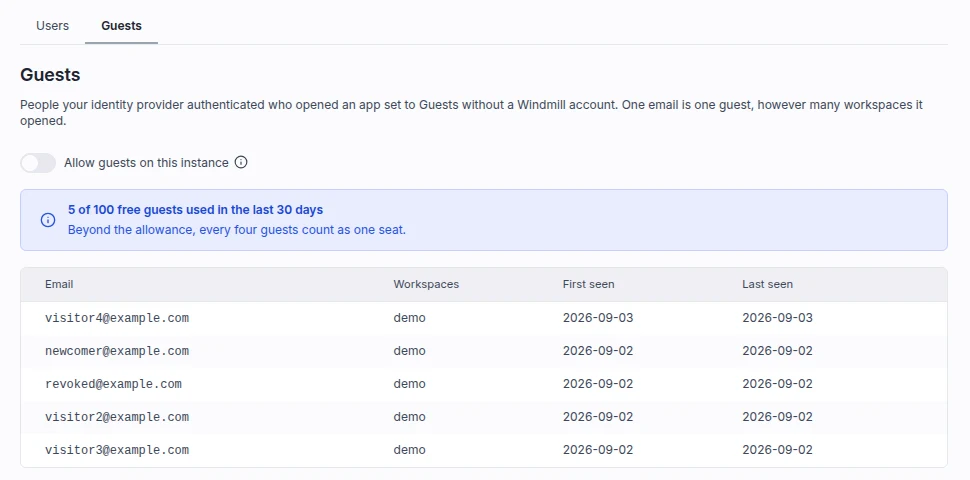
Turned off, no guest can get in anywhere on the instance whatever a workspace or an app says, whether they sign in or carry a JWT: apps stop offering a guest sign-in, and guests already in stop on their next request.
The same tab lists the distinct guest emails of the trailing 30 days with the workspaces they opened and when they were first and last seen. See instance settings.
How a guest signs in
A signed-out visitor opening the app URL is offered a sign-in card that says they do not need a Windmill account, and that signing in lets them open this app and nothing else.
- The sign-in goes through one of the instance's configured SSO or OAuth providers, or SAML. Password sign-in is not a guest path, since a guest has no stored credential.
- No account is provisioned: no user row, no invite, no workspace membership. The instance setting "Require users to have been added manually to Windmill to sign in through OAuth" gates provisioning an account, which a guest sign-in never does, so it does not block guests.
- Someone who already has a Windmill account anywhere on the instance is never given a guest session. If they are not a member of the app's workspace, the page tells them the app is not open to them rather than looping them through a sign-in that cannot help.
- A sign-in the server refuses, for instance because the allowance is used up or the app is no longer open to guests, is relayed back to the page and shown above the card.
The result is a browser session pinned to that workspace and scoped to that one app.
It expires after 8 hours by default, configurable with the GUEST_SESSION_VALIDITY_SECONDS environment variable.
Expiry is the main revocation for a guest, alongside the app's own access mode and the workspace and instance switches; logging out ends the session too.
A guest becomes a member by signing in from the ordinary login page with the same identity, which provisions the account as any first sign-in would. From then on they are counted like any other user.
Guest sign-ins are recorded in the audit logs as users.login_guest.
Guest JWT for embedded apps
A guest can also enter through a JWT your own backend mints and signs, carried on the app URL. This is the entry for an app embedded in your own product, where your users are already authenticated on your side: there is no sign-in card and no round trip to an identity provider. The token is verified on every request against a key the workspace holds, and nothing is stored, so there is no session to expire or log out of.
The three switches above gate a JWT guest exactly as they gate a signed-in one, and the workspace needs a verification key on top of them. Everything else is unchanged: the same confinement to one app, the same allowance, and the same refusal of anyone who already has a Windmill account.
Configuring the verification key
A workspace admin sets the key next to the guest switch, under workspace settings > Advanced > Apps, as one of:
- a PEM public key (
-----BEGIN PUBLIC KEY-----), RSA or EC; - a JWKS URL, which must be
httpsand publicly reachable. Each key in the set needs akid, tokens are matched against it, and the set is refreshed every 15 minutes.
Only one of the two is kept at a time, and a PEM key ignores kid.
The key is validated when it is saved, so a PEM that is not an RSA or EC public key, and a JWKS URL that cannot be fetched or holds no usable signing key, are refused there rather than silently on every guest afterwards.
A URL resolving into a private address range is refused too, and redirects are not followed.
Point the key at an issuer you control: any token it signs carrying the claims below is admitted as a guest, so an issuer shared with other tenants is not a good fit.
On a self-hosted instance, a workspace that sets no key falls back to the instance's external JWT issuer (JWT_EXT_JWKS_URL) when one is configured, so an operator running a single issuer configures it once.
On Windmill Cloud, the per-workspace key is the only source.
What a token carries
Four claims are mandatory, and any other claim is ignored:
email: the guest's identity, and the email the allowance counts. It must belong to no Windmill account, as for a guest sign-in.workspace_id: the workspace the app lives in. A token is never accepted on a route that names no workspace.app_path: the path of the one app the token opens, which has to be set to Guests.exp: the expiry.nbfandiatare validated when present, and a lifetime longer than 24 hours is refused.
Accepted algorithms are RS256, RS384, RS512, PS256, PS384, PS512, ES256 and ES384.
Symmetric algorithms (HS*) are refused: verifying one would mean handing the signing secret to Windmill.
Minting a token with fast-jwt, signed with the private half of the key configured above:
import { createSigner } from 'fast-jwt'

const PRIVATE_KEY = `-----BEGIN PRIVATE KEY-----...-----END PRIVATE KEY-----`

const signer = createSigner({
  algorithm: 'ES256',
  key: PRIVATE_KEY,
  expiresIn: 15 * 60 * 1000 // 15 minutes, 24h at most
})

export async function guestJwt(email: string) {
  return await signer({
    email,
    workspace_id: 'my_workspace',
    app_path: 'f/my_folder/my_app'
  })
}
Opening the app with a token
Append the token to the app URL as a last guest.<jwt> segment, either on the secret public URL:
https://app.windmill.dev/public/my_workspace/<secret>/guest.<jwt>
or on the app's custom URL:
https://app.windmill.dev/a/<custom-path>/guest.<jwt>
Embedding it is a plain iframe on that URL:
<iframe src="https://app.windmill.dev/public/my_workspace/<secret>/guest.<jwt>" title="Windmill app" width="100%" height="600"></iframe>
The Deploy menu of an app set to Guests generates that snippet for you, pre-filled with the app's workspace and path.
To call the API directly rather than open the app, pass the token as a bearer prefixed with jwt_guest_:
curl -H "Authorization: Bearer jwt_guest_<jwt>" \
  https://app.windmill.dev/api/w/my_workspace/apps/get/p/f/my_folder/my_app
Expiry and revocation
A JWT guest holds no session row, so exp is what ends their access: mint a short-lived token per user session.
The workspace and instance switches are read on every request a guest makes, JWT or not, so turning either off stops a JWT guest on their next request, as it does a signed-in one.
Rotating or clearing the key takes a few minutes longer: a token that verified is resolved from a cache for up to 5 minutes before it is verified again.
A token an app derives for itself, such as the one a sandboxed full-code app uses to call the API, never outlives the JWT it came from.
A JWT guest is recorded in the audit logs as users.login_guest, like a sign-in, once per email and workspace per day, with the entry kind (jwt) in its parameters.
How it differs from the external JWT
Windmill also has an instance-level external JWT scheme, whose bearer prefix is jwt_ext_.
A guest key is deliberately narrower: whatever a token says, it can only ever produce a guest.
External JWT (jwt_ext_) | Guest JWT (jwt_guest_) | |
|---|---|---|
| Key configuration | instance-wide, JWT_EXT_PUBLIC_KEY or JWT_EXT_JWKS_URL, set by the operator | per workspace, set by a workspace admin |
| What the claims assert | admin or operator, groups, folders, scopes, one or several workspaces | an identity only: a guest, in one workspace, on one app |
| Reach | everything the claims grant in those workspaces | the one app named by app_path, and only while it is set to Guests |
| Edition | Enterprise Edition only | every plan, free up to the guest allowance |
| Billing | a unique external JWT user, counted as half a seat | counted against the guest allowance, then four guests to a seat on Enterprise |
What a guest can do
A guest holds no group, no folder and no permission of their own, so what their session grants is the whole of what they can do:
- open the one app they were admitted for and use it, with its runnables executing on behalf of the publisher under the app's policy, exactly as for a member.
- read the jobs they launched themselves through the app, and nothing else. A job shared with the workspace's members is not readable by a guest, and a job they may not read is reported as not found.
- nothing outside the app: listing jobs, scripts, flows, apps or variables, reading resource values, another workspace, and another app opened to guests are all refused. A public app stays open to them, as it is to anyone.
Inside a runnable, WM_END_USER_EMAIL holds the guest's email, like it does for a logged-in member.
See identifying the app viewer.
Guest executions count against the public app rate limit alongside anonymous ones.
Seats and the guest allowance
Every Windmill seat counter counts user rows, and a guest has none, so guests never appear in them. What they count against instead is a single instance-wide allowance:
- the first 100 distinct guest emails over a trailing 30 days are free everywhere, the free Community Edition included.
- past that, an instance holding an Enterprise Edition license meters them at four guests to one seat, rounded up. Those seats count against the license like any other.
- past that, an instance without one admits no new guest email until the count drops back under 100. A guest already seen in the window is always let back in, so the cap only ever turns away someone new.
The allowance is read from the instance's license, not from a workspace's plan, and one email is one guest however many workspaces they opened. The current count is shown in three places: under the Access control in the app editor, on the Guests card in workspace settings, and on the Guests tab in instance settings.
Guest records are kept for 60 days, whichever entry they came in through, longer than the 30-day window they feed. They are not attributed to a single workspace and so do not appear in a workspace's billable seats.
CLI and git sync
The access mode is the one policy field a tracked app file keeps, in app.yaml for low-code apps and raw_app.yaml for full-code apps.
It is a tri-state:
public: true   # anonymous: no login required
guests: true   # guest: an identity required, membership not
# neither      # publisher: workspace members only
A pull followed by a push round-trips the mode, so an app open to guests stays open to guests through git sync.
Pushing guests: true does not by itself let anyone in: the workspace and instance switches are read every time a guest session is created and on every request a guest makes.